 Coming 1 December 2026
Calories and macros, read on your phone.
Snap a meal, scan a label or search a food. An AI model on your phone reads it, you check the numbers, and your calories and macros add up against targets built from your weight and goal.
In closed testing on Google Play. Public release expected 1 December 2026. Android only.
- 100% on-device AI
- Works offline
- No account
- Pay once, no subscription
- 8 languages
Why it is different
A calorie counter whose AI lives on your phone
Many AI food trackers send your meal photos to a server to be read. SmartSight AI Nutritionist runs the model on the phone in your hand: it reads meal photos and nutrition labels, matches recipe ingredients, builds meal plans and answers your questions without a connection once the model is downloaded.
No account to create, no ads, and no monthly bill. One purchase, and the AI keeps working on a plane or with the Wi-Fi off.
How it works
From first meal to daily targets
No account and nothing to sign up for. Download the AI model once and start logging.
Download the model once
The AI model is about 2.8 GB (Wi-Fi recommended). SmartSight AI BodyTracker and SmartSight AI FormCoach are built to share the same copy, so it is downloaded once per phone.
Log food your way
Meal photo, nutrition label, barcode, food search or manual entry. The AI reads photos and labels on the phone, and you check the numbers before anything is saved.
Follow your targets
Calories, protein, carbs, fat and fibre targets come from your bodyweight and goal, and update when you log a new weigh-in.
Calories and macros
Every calorie and macro at a glance
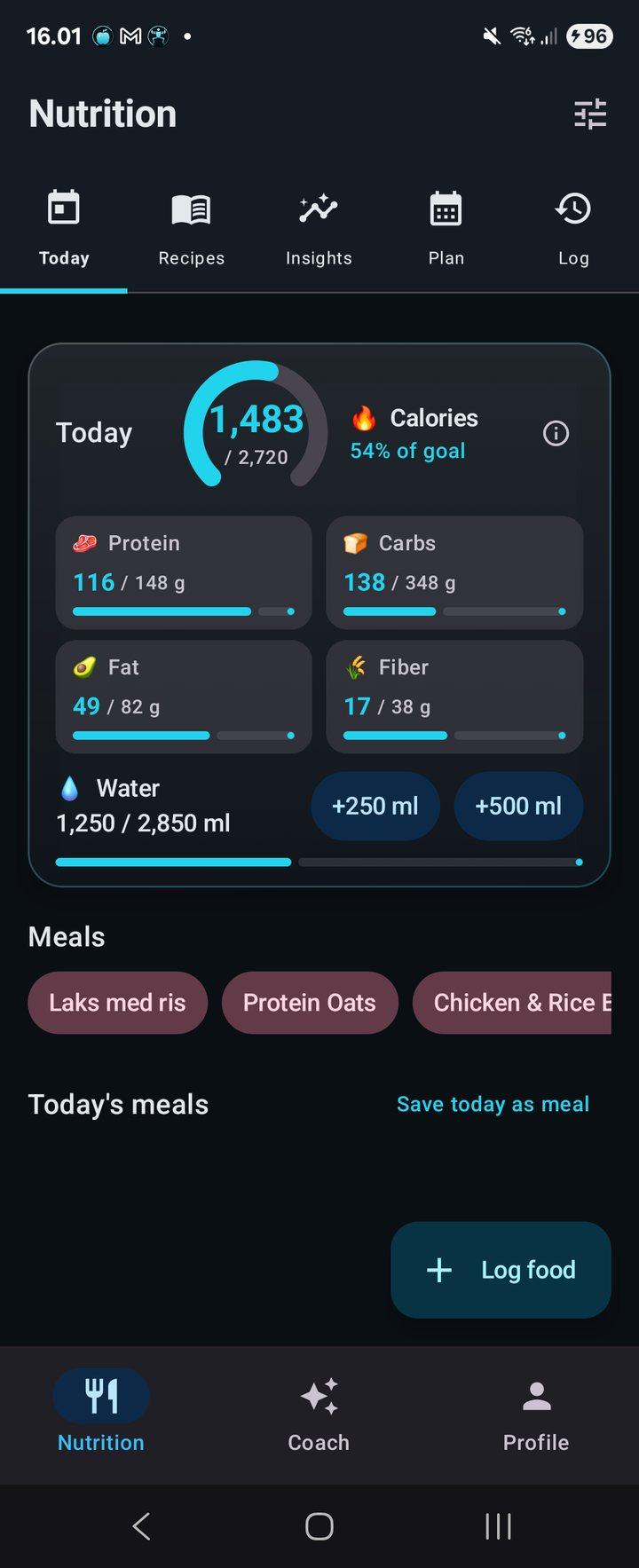
The Today screen shows calories, protein, carbs, fat, fibre and water against targets set from your weight and goal.
- Daily targets for calories, protein, carbs, fat and fibre
- A new weigh-in updates your targets
- Activity level suggested from Health Connect steps, or set it yourself
- Prefer your own numbers? Set targets by hand
- Water tracker with +250 ml and +500 ml buttons
Logging
Scan a nutrition label in seconds
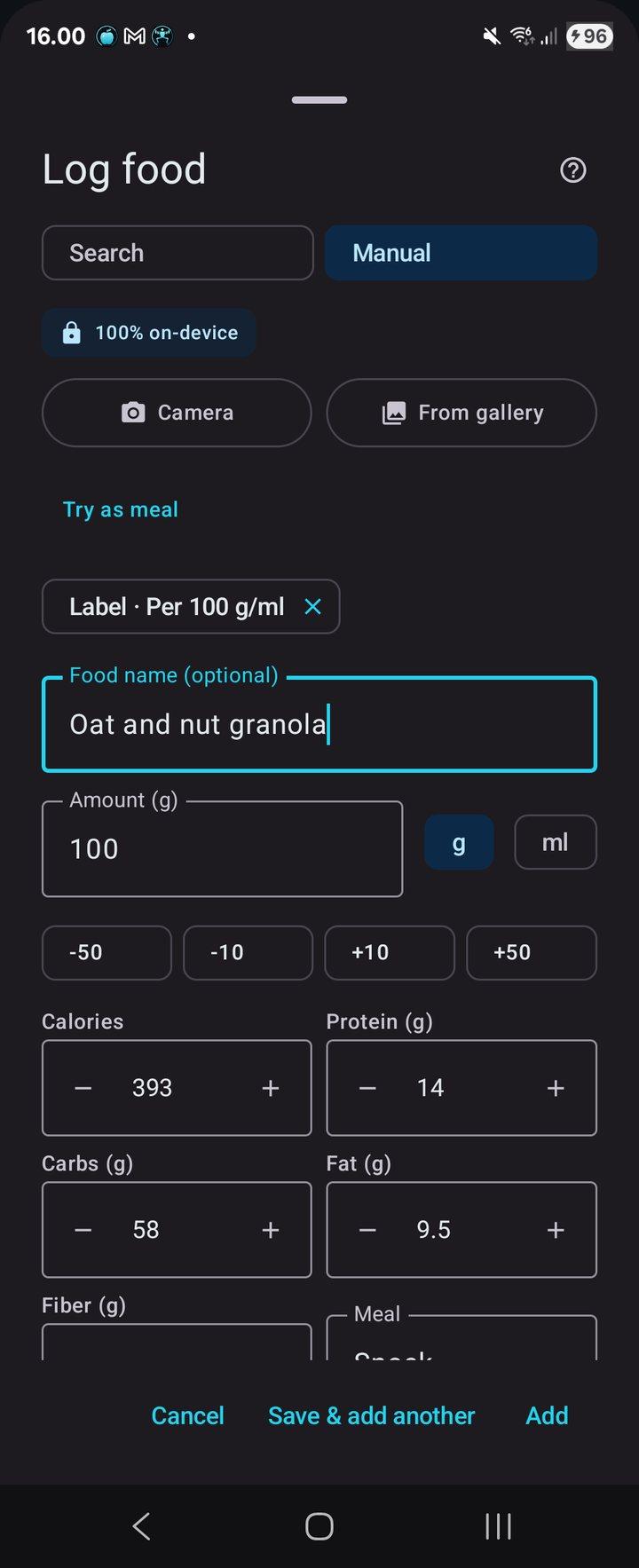
Point the camera at a label, or pick a photo from your gallery, and the AI on your phone fills in the log form. Prefer a meal photo? It estimates the food, calories and macros for you to review.
- Label values per 100 g/ml or per serving: calories, protein, carbs, fat and fibre
- Meal photo estimates you review and edit before saving
- Barcode scanner finds products you have logged before, offline
- Optional OpenFoodFacts lookup, off until you turn it on
- Food search, saved products, supplements and quick entries
- Quick +/-10 g and +/-50 g amount buttons
Recipes
Paste a recipe, the AI does the maths
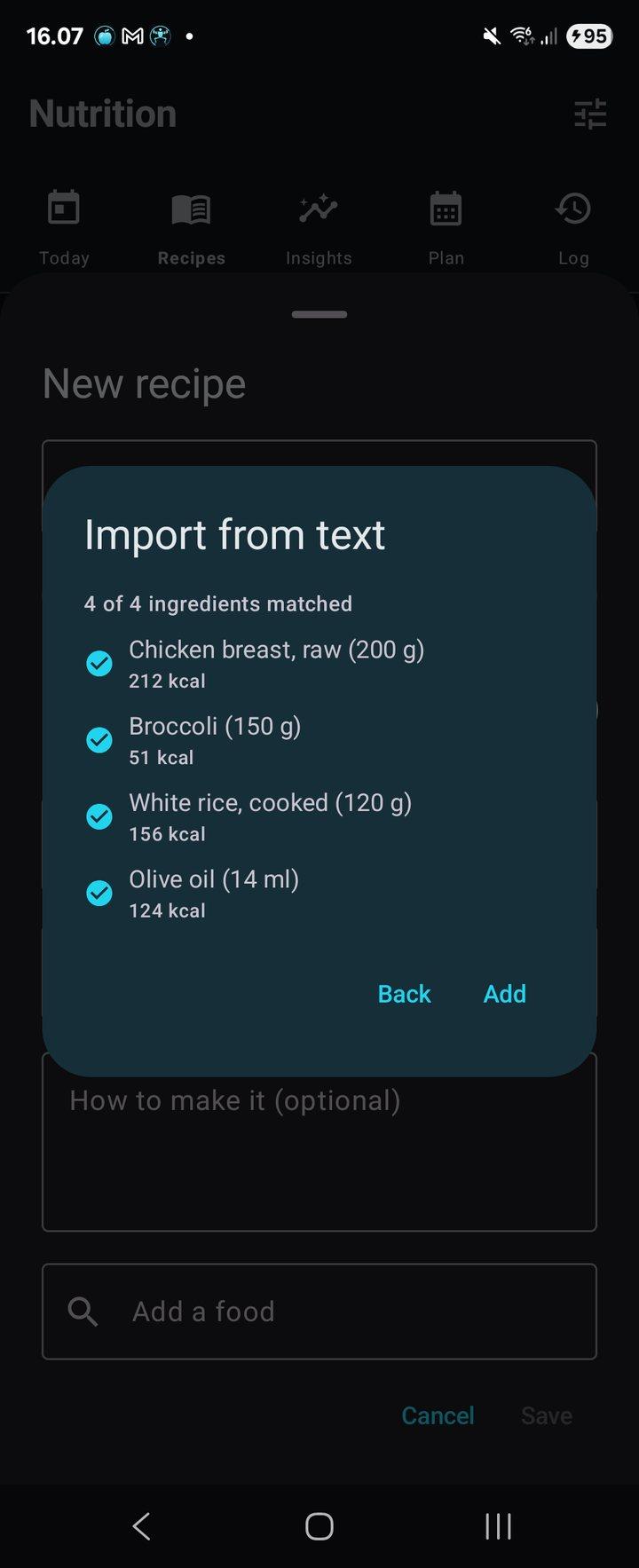
Save your own recipes or import one from pasted text, a web address or another app's share button. The AI matches each ingredient to nutrition values on your phone.
- Import from text, a link or the Android share button
- Each ingredient matched to calories and macros
- Keep your own recipes alongside imported ones
Meal plans
AI meal plans around your targets
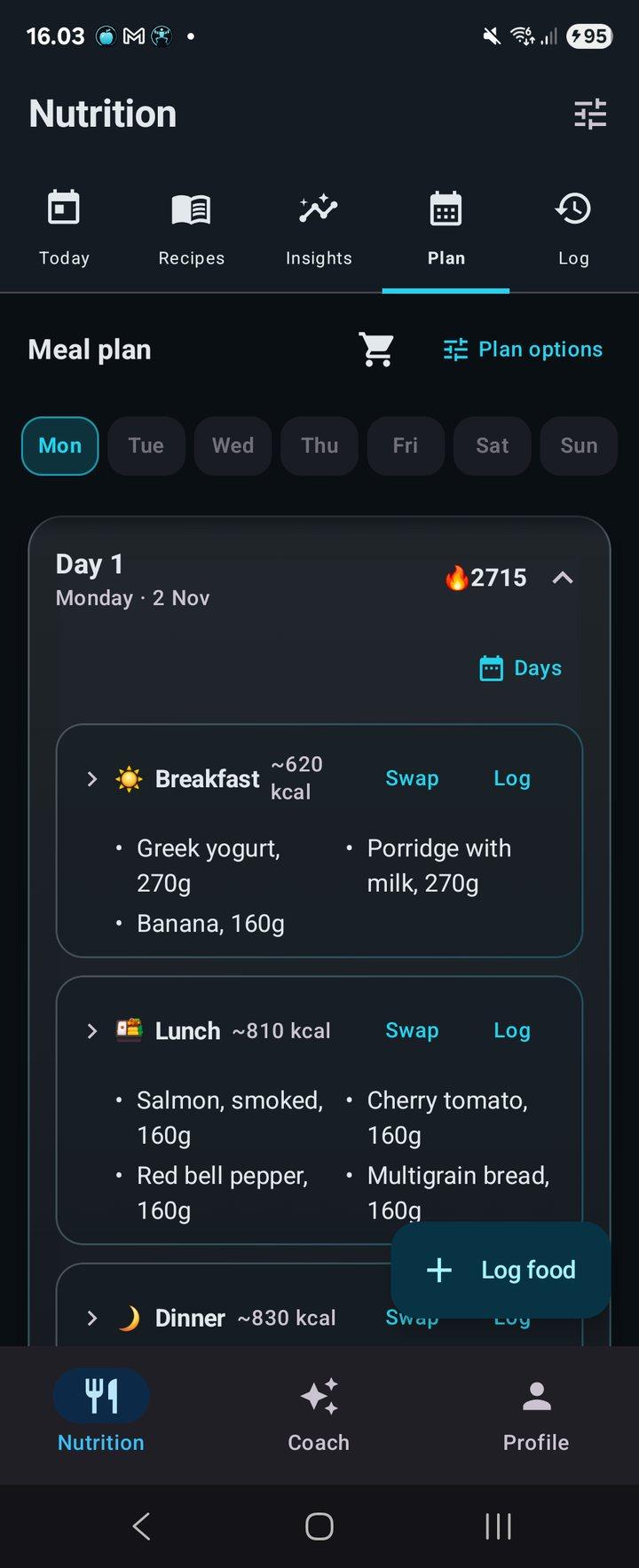
Generate a plan of one to seven days built around your calorie and macro targets, with options such as higher protein. Swap any meal you do not fancy, or log it straight from the plan.
- Plans of one to seven days, each day different
- Swap or log each meal
- Plan options such as higher protein
- Week history and a grocery list
Nutrition coach
A private nutrition coach
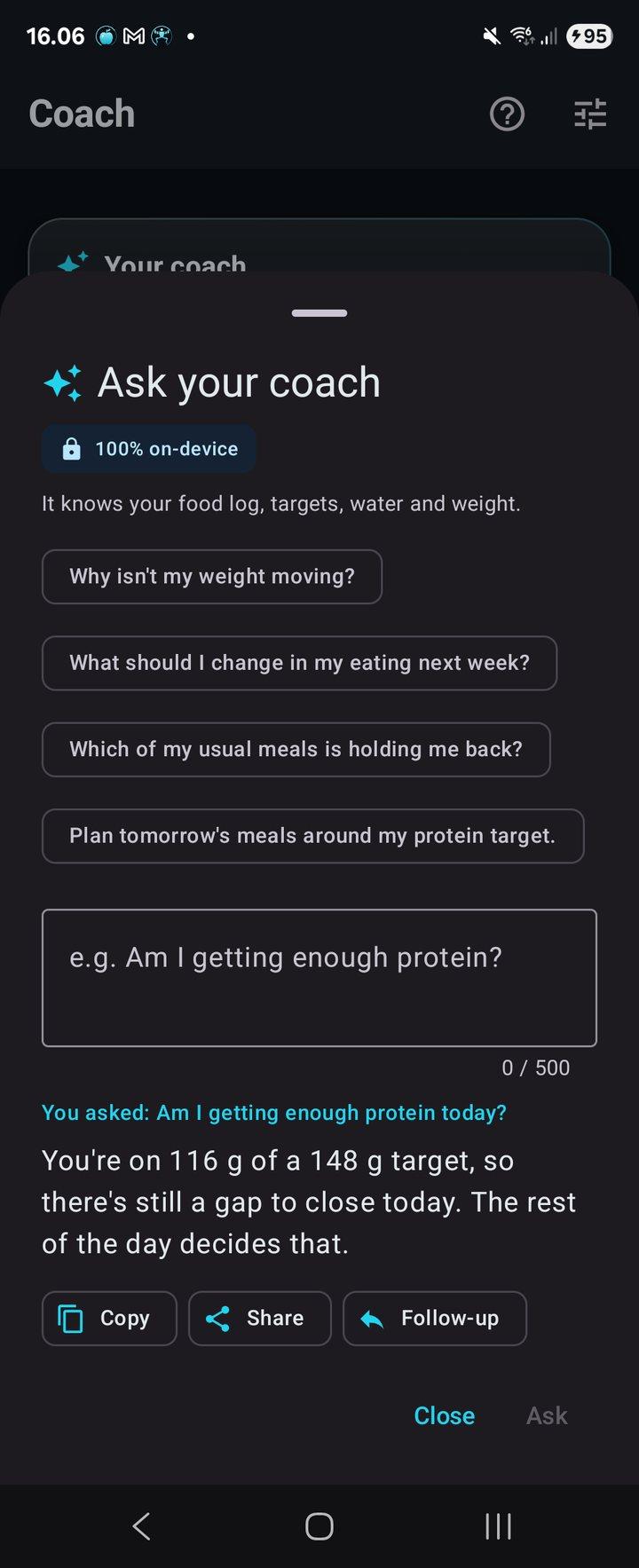
Ask why the scale is not moving or whether you are getting enough protein. The coach knows your food log, targets, water and weight, and runs on your phone.
- Answers based on your own log and targets
- It can log food for you
- Copy, share or ask a follow-up
- Text only, no voice
Coming to Google Play on 1 December 2026.
One purchase. No subscription, no in-app purchases, no ads.
Everything else
The details that keep you logging
Beyond the food diary: water, weight, imports, backups and more.
Meal photo estimates
Take a picture of a meal and the on-device AI estimates the food, calories and macros. You review the numbers before saving.
Barcode scanner
Finds products you have logged before, offline. Online lookup in OpenFoodFacts is a setting you turn on.
Water and reminders
A daily water target with hydration reminders that stay quiet while you are on pace.
Weight log and goal
Log weigh-ins and set a goal weight to see how far there is to go.
Insights and micronutrients
An Insights tab with trends, plus micronutrient totals for foods that carry them, alongside Today, Recipes, Plan and Log.
Health Connect, optional
Off by default. Writes meals, water and weigh-ins; reads weigh-ins and 14-day step totals, only while the app is open.
MyFitnessPal import
Paste your MyFitnessPal printable diary and your food history comes with you.
Encrypted backups
Backups are encrypted with a key tied to your purchase. Optional nightly backup to a folder you choose.
Eight languages
English, Danish, German, Spanish, French, Norwegian, Swedish and Chinese.
Your food log stays on your phone
The AI that reads your meals, labels and recipes, builds your plans and answers your questions runs on the phone. There is no account, and your food log, photos, coach chats and weight are stored on the device.
On-device AI
Meal photos, label reading, recipe matching, meal plans and the coach all run locally. After the one-time model download the AI makes no network calls and works offline.
No account, no ads
There is nothing to sign up for and no ads. The developer does not run a cloud backup of your data.
What goes online
The one-time model download, Google Play's purchase check, a recipe page when you import from a link, and the OpenFoodFacts barcode lookup if you turn it on (only the barcode number is sent). Your food log, photos and coach chats are not uploaded.
Health Connect stays private
Off by default. Its data is used on the phone, is not sent to the developer or third parties, and is not used for advertising.
SmartSight AI Nutritionist is not a medical device. It gives estimates for personal tracking, not medical advice.
Pricing
Pay once. No subscription.
One purchase on Google Play. No subscription, no in-app purchases, no ads.
SmartSight AI Nutritionist
Paid once on Google Play. Local prices may vary.
- Every feature included: logging, targets, recipes, meal plans and the coach
- No in-app purchases and no ads
- No account needed
- AI runs on your phone and works offline
- Android only (64-bit phones)
FAQ
Questions, answered
The app is in closed testing on Google Play now. Public release is expected on 1 December 2026.
No. There is no account and no subscription. You pay once on Google Play and there are no in-app purchases or ads.
Yes. The AI model downloads once (about 2.8 GB, Wi-Fi recommended) and then all AI features run on the phone without a connection. Online barcode lookup in OpenFoodFacts is optional and off until you turn it on.
Usually not. The model is kept in Documents/SmartSight/models, and SmartSight AI Nutritionist, BodyTracker and FormCoach are built to share one copy so it is downloaded once per phone. The main SmartSight AI coach app keeps its own copy.
They are estimates. The app shows the food, calories and macros it read, and you check and adjust the numbers before anything is saved. Label scans read the values printed on the package, and barcodes use your saved products or, if you turn it on, OpenFoodFacts.
Yes. Paste your MyFitnessPal printable diary to import your food history. Health Connect is optional: the app can send meals, water and weigh-ins to it and read weigh-ins and step counts from it.
Backups made in the app are encrypted with a key tied to your purchase, and you can turn on a nightly backup to a folder you choose. The developer does not keep a cloud copy.
A 64-bit (arm64) Android phone. There is no iPhone version. The app is available in English, Danish, German, Spanish, French, Norwegian, Swedish and Chinese.
No. SmartSight AI Nutritionist is not a medical device. It gives estimates for personal tracking.
Count calories. Keep them private.
Calories, macros, meal plans and a nutrition coach, all on your phone and offline. Coming to Google Play on 1 December 2026.